
The Doherty Threshold: Why Fast Responses Keep People Working
The Doherty threshold says people stay productive when a computer responds in under about 400 milliseconds, so neither side waits on the other. It comes from a 1982 IBM paper, which found people worked faster, not just the machine, as response time fell. The paper never names 400 ms. Make responses fast, and make slow ones feel handled.
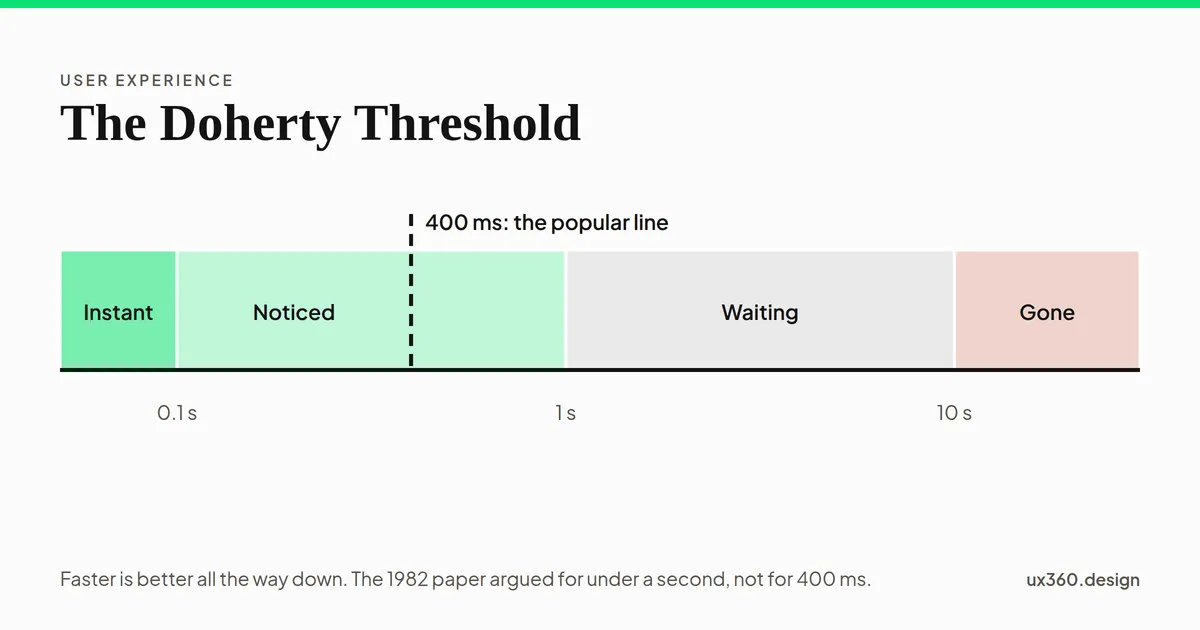
What is the Doherty threshold? The Doherty threshold is the idea that people stay productive when a computer responds in under about 400 milliseconds, so that neither the person nor the computer has to wait for the other.
It is one of the best-known laws of UX. It is why designers care about speed down to the millisecond. The story behind it is a little different from the version usually told, and the real finding is more useful.
In short
- The claim: respond in under about 400 milliseconds, and people work faster and stay engaged.
- The source: a 1982 IBM paper by Walter Doherty and Ahrvind Thadani. It found that as computers responded faster, people worked faster too.
- The catch: the paper never names 400 ms. It argued for under a second, with data down to 0.3 seconds.
- What to do: make responses fast, acknowledge every tap at once, and make the waits you cannot remove feel handled.
Where does the Doherty threshold come from?
In the early 1980s, many people thought a computer that answered within 2 seconds was fast enough. The idea was that people used the wait to think about their next step.
In November 1982, two IBM engineers, Walter Doherty and Ahrvind Thadani, wrote a paper called “The Economic Value of Rapid Response Time.” They pulled together several IBM studies. Their case was that 2 seconds was far too slow.
The clearest data came from Thadani’s own work with programmers. As the computer’s response time fell from 3 seconds to 0.3 seconds, the number of tasks a programmer finished in an hour roughly doubled, from 180 to 371. Pick a response time below and see where the time went.
At 3 seconds of computer response, the programmers completed 180 transactions an hour: 20 seconds each, of which 3 were the computer and 17 were the person. This is the slowest setting in the data, slower than the 2 seconds many people then thought was fast enough.
The surprise is in the bar. Cutting 2.7 seconds of computer time saved about 10 seconds per task, because the programmers themselves got faster. The paper’s explanation: people hold their next few steps in short-term memory, and a long wait breaks that train of thought. So every slow response costs more than its own length.
What the paper does not say. It never mentions 400 milliseconds. It argues for “sub-second” response, and its fastest data point is 0.3 seconds. The 400 ms figure comes from later summaries of the paper, and it has stuck.
What kind of evidence it is. The paper is an economic case, as its title says. It works out the dollar value of faster systems, and IBM sold those systems. Its studies are IBM’s own work with its own users, on 1980s computers, not controlled experiments. That does not make it wrong. Later research points the same way.
What newer research says about response time
The most widely used guide is older than Doherty. In 1968, Robert Miller wrote about how long people will wait for a computer to answer. Jakob Nielsen later boiled it down to three limits:
- 0.1 second: the response feels instant, as if people are moving things directly.
- 1 second: people notice the delay, but their train of thought is not broken.
- 10 seconds: about the limit of attention. Past it, people turn to something else.
Slide the response time and see where it lands.
A response in 300 milliseconds is noticed, but people stay in their flow of thought. No loading sign is needed, though the button should show at once that it was pressed. It is inside the popular 400 ms Doherty line.
Even small delays change behavior. In 2009, Google slowed its search results by 100 to 400 milliseconds for some users, on purpose, for several weeks. Those users searched 0.2% to 0.6% less. The effect grew the longer the delay lasted, and it stayed for weeks after the delay was removed.
Today, Google’s Core Web Vitals measure how fast a page responds to taps and clicks. They call 200 milliseconds or less good.
So the exact number is not magic. Faster is better, all the way down, and the best-supported lines are the 0.1, 1 and 10 second limits.
When you cannot be fast: make the wait feel handled
Some things take time: uploading a photo, running a report, paying. The goal then is that people always know what is happening.
- Acknowledge every tap within 0.1 second. A pressed button, a changed color or a small movement says “got it,” even if the real work takes longer.
- Under a second, skip the loading sign. A spinner that flashes for a moment looks like a glitch. A common fix is to wait about half a second before showing one.
- For a few seconds, show that work is happening. A spinner or a skeleton screen, which shows the shape of the page before the content arrives. The evidence on which feels faster is mixed: in a 2017 test by the agency Viget, people guessed the wait was longest with a skeleton screen, while other small studies found a slight edge for skeletons.
- Past 10 seconds, show progress and the time left. People want to know whether to wait or do something else. Let them leave and come back.
- Show the result at once when you can. This is called an optimistic update. A liked post turns red straight away, and the server catches up in the background. Only do it when the action almost always works, and undo it clearly if it fails.
How to apply the Doherty threshold
- Measure real response times. Test on an ordinary phone and a slow connection, not just your own laptop.
- Make the common actions fastest. Typing, tapping, opening menus and moving between screens matter most, because people do them hundreds of times.
- Respond to input first, then do the work. Show the press, open the menu, then load what is inside.
- Load what people need first. Text and buttons before large images. A page that is usable early feels faster.
- Do not hide slowness behind animation. A long transition is still a wait. Keep movement short.
- Be honest about long waits. A progress bar that sits at 99% for a minute does more harm than none.
- Treat speed as a design decision. A slow page is a design problem, not only an engineering one.
Try it yourself: handle the wait
A phone is saving a new item. Set how long the save really takes, then choose what the screen shows in the meantime. The readout checks whether the two fit.
Saving takes 3 seconds, and meanwhile a spinner shows. Fits. A spinner suits a wait of a few seconds. The research on which feels faster is mixed.
The right choice changes with the wait. Under a second, the best loading sign is none. For a few seconds, a spinner or a skeleton screen. Past 10 seconds, a progress bar with the time left. And when the action almost never fails, showing the result at once makes the wait disappear.
The Doherty threshold and other laws of UX
- Fitts’s law is about the time to reach a target. The Doherty threshold is about the time the screen takes to answer.
- Hick’s law is about the time to choose. A slow response adds to it every time.
- The goal-gradient effect explains why a progress bar helps people finish a long wait.
- The peak-end rule warns that one painfully slow moment can color how people remember the whole product.
- See them all in the laws of UX, ordered by what the user is doing.
Common mistakes
- Treating 400 ms as a hard line. It is a popular figure, not a finding. Aim lower where you can.
- Testing only on fast devices. Most of your users are on slower phones and networks than you are.
- Spinners for everything. A spinner for a 200 millisecond wait flashes, and a spinner for a 30 second wait tells people nothing.
- Fake progress bars. People notice when the bar has nothing to do with the work.
- Optimistic updates for risky actions. Showing a payment as done before it is confirmed breaks trust when it fails.
- No feedback on tap. If nothing changes the moment people tap, many will tap again, and do the action twice.
Frequently asked questions
What is the Doherty threshold?
The Doherty threshold is the idea that people work faster and stay engaged when a computer responds in under about 400 milliseconds. It is named after Walter Doherty, who wrote a 1982 IBM paper with Ahrvind Thadani on the value of fast response times.
Where does the 400 millisecond figure come from?
Not from the original paper. Doherty and Thadani's 1982 paper argued for sub-second response and reported data down to 0.3 seconds, but it does not name 400 milliseconds. The figure comes from later summaries of the paper.
What response time should a website aim for?
Respond to every tap or click within about 100 milliseconds, even if only to show it was pressed. Keep full responses under a second where you can. Google's Core Web Vitals call a page's response to input good at 200 milliseconds or less.
Are skeleton screens better than spinners?
The evidence is mixed. In one 2017 test, people who saw a skeleton screen guessed the wait was longer than people who saw a spinner. Other small studies found a slight edge for skeletons. Either works for a wait of a few seconds; for long waits, show progress and time left.
The UX Foundation Course, free
Become the person in the room who understands the user when everyone else is guessing. 4 chapters, 27 free lessons, no sign-up.

Written by