
Progressive Disclosure in UX: Show Less First, Without Hiding What Matters
Progressive disclosure means showing the most important options first and moving advanced or rarely used ones to a second screen, a link or a later step. It makes interfaces easier to learn and less error-prone, as long as the split is right and the hidden options are easy to find. Hide the wrong things, and people cannot find them.
What is progressive disclosure? Progressive disclosure is showing people the most important options first, and moving advanced or rarely used ones to a second screen, a link or a later step.
It is one of the oldest tools for making complex software simple. A print dialog shows copies and pages, with “More settings” for paper type and margins. A search box has an “Advanced search” link. The full power is still there; it just waits until someone needs it.
In short
- What it is: show the essentials first, and the rest on request.
- Why it works: fewer choices up front make an interface faster to learn and harder to get wrong.
- The two rules: split the features correctly, and make the hidden part easy to find.
- When it fails: when the hidden options are ones many people need, or when the way to them is unclear.
How progressive disclosure works
You split the features or fields into two groups:
- Primary: what most people need, most of the time. Shown up front.
- Secondary: what a few people need, or what most people need only now and then. One click away.
Here is the same checkout form shown three ways. Switch between them.
All twelve fields on one screen. Nothing is hidden, but everyone faces gift wrap, gift message, company name and tax number, which most people do not need, and the form looks long before anyone starts.
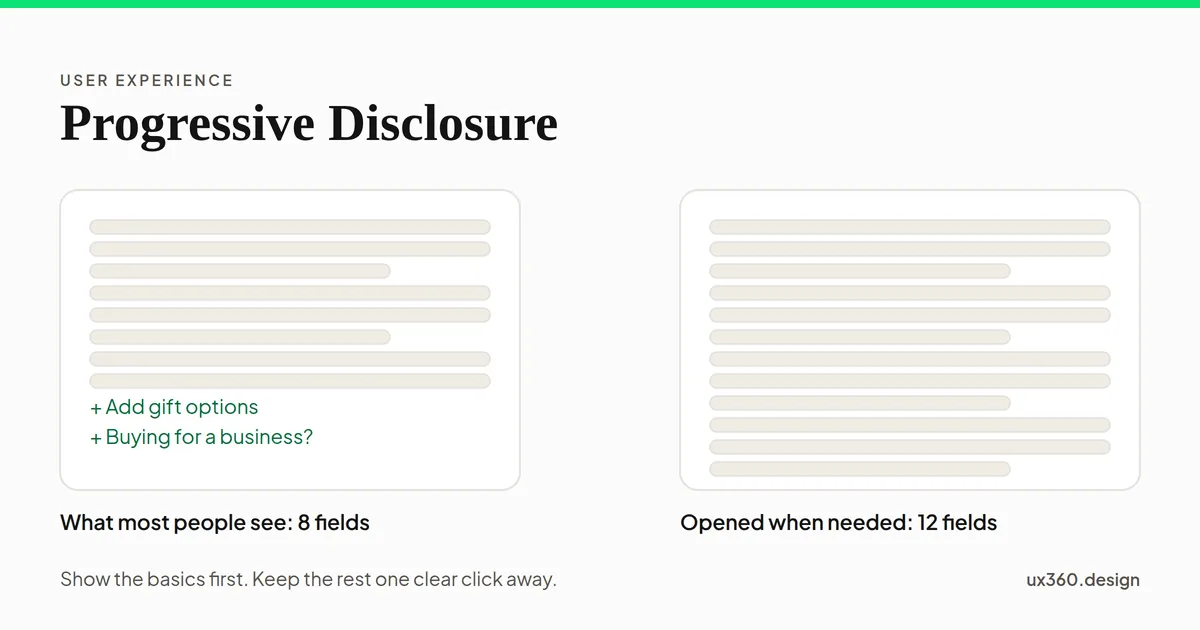
Showing everything at once makes every shopper face gift wrap and tax numbers. Splitting the form into steps makes each screen shorter, but adds screens and still shows the rare fields to everyone. Putting the rare fields behind clear links gives most people a form of eight fields instead of twelve, while the few who need gift options or a company name know exactly where to look.
The research: training wheels
The best-known evidence comes from IBM in the early 1980s. John M. Carroll and C. Carrithers gave beginners a word processor with “training wheels”: the advanced functions that tended to lead new users into errors were blocked.
All 12 commands are open, including advanced ones beginners rarely need and often stumble into. In Carroll and Carrithers' 1984 study, people learning on the full system spent close to a quarter of their time recovering from errors that the blocked version would have prevented.
The results, published in 1984, were clear. People on the training wheels system learned faster and understood the system better afterwards. People on the full system spent close to a quarter of their time recovering from errors that the blocked version would have prevented. A later study by Richard Catrambone and Carroll found that people who learned with training wheels also did better on the advanced functions once they were switched on.
That is the case for progressive disclosure: less to get wrong at the start, without losing the power later.
A fair caution. Training wheels is not quite the same as hiding features behind a link. Carroll and Mary Beth Rosson later pointed out that there was little direct evidence on progressive disclosure itself. The idea is well supported in spirit, and its success depends on the details.
Progressive disclosure vs staged disclosure
These two are often confused.
- Progressive disclosure splits features into a main set and an optional set. Most people never open the optional set.
- Staged disclosure splits a task into steps that everyone goes through in order, like a multi-step checkout or a setup wizard.
Both reduce what people see at once. Staged disclosure suits long tasks with a natural order. Progressive disclosure suits features that only some people need.
How to use progressive disclosure
- Find out what people actually use. Analytics, support tickets and user research tell you what belongs up front. Do not guess.
- Put the common things first. If most people need it, it should not be hidden.
- Name the way in clearly. “Advanced settings” or “Add gift options” says what is behind it. A bare “More” says almost nothing.
- Keep it to one level. A secondary screen is fine. Options hidden inside options inside options get lost.
- Show that more exists. A chevron, a link or a count, like “More settings (8),” tells people there is something to find.
- Remember what people open. If someone always opens the advanced panel, consider keeping it open for them.
- Do not hide anything risky or required. Prices, terms and anything people must see to make a fair choice stay in view. Hiding those is a dark pattern, not progressive disclosure.
Try it yourself: what to show up front
Here is a settings page with twelve options, sorted by how often each is the one people came for. The numbers are made up, but the shape is typical: a few settings get most of the visits. Decide how many to show before a “More settings” link.
4 of 12 settings are shown up front. With these made-up numbers, people find what they came for without opening More on 71% of visits; the other 29% need one extra click. Showing one more setting would help only 7% more, while adding a row for everyone to scan.
With the first four shown, about 7 in 10 visits find their setting straight away, and the list stays short. Each extra row helps fewer people and adds one more thing for everyone to scan. That is the same shape as the 80/20 rule: a few options carry most of the use. The right cut-off depends on your real numbers, which is why step 1 is to measure.
Progressive disclosure and other principles
- It reduces the number of choices up front, which Hick’s law says makes deciding faster.
- It works because people find visible options easily, as recognition over recall explains, so the way in must stay visible.
- It groups related options, like chunking does for information.
- Hiding things people need, or things they should see, slides into dark patterns.
- Showing less on the first screen is a form of hierarchy: the most important things first.
Common mistakes
- Hiding common features. If many people need it, every one of them pays an extra click.
- Vague labels. “More,” “Other” and “Options” give no clue what is behind them.
- Too many levels. Each level of nesting loses more people.
- Hiding to look minimal. An empty screen is not the goal. A screen that is easy to use is.
- Hiding what people need to decide. Fees, limits and terms belong up front.
Frequently asked questions
What is progressive disclosure in UX?
Progressive disclosure is a design technique that shows the most important or common options first and defers advanced or rarely used ones to a secondary screen, a link, an expandable section or a later step.
What are examples of progressive disclosure?
Advanced settings behind an Advanced link, a More options menu, accordions that expand, a checkout that asks for gift details only if you choose gift wrap, and step-by-step wizards that show one part of a task at a time.
What is the difference between progressive and staged disclosure?
Progressive disclosure splits features into a primary set and a secondary set that people can open if they need it. Staged disclosure splits a task into steps that everyone goes through in order, like a multi-step form.
When should you not use progressive disclosure?
When people need the hidden options often, when they need to compare everything at once, or when the link to the hidden part is unclear. Hiding a feature that many people use only adds a click and makes it harder to find.
The UX Foundation Course, free
Become the person in the room who understands the user when everyone else is guessing. 4 chapters, 27 free lessons, no sign-up.

Written by